Managing a retail store or restaurant is a complex challenge. You have hundreds of products to track, employees to manage, and customers who expect fast, friendly service. Trying to juggle these tasks with a basic cash register is nearly impossible.
It leads to mistakes and lost revenue. Modern business owners need a partner that works as hard as they do. They need a digital system that organizes the chaos.
Smart Payment Solutions helps companies find the right tools for success. We often recommend solutions that have a long history of reliability. This is why pc america software remains a top choice for thousands of merchants. It is powerful and stable. It covers everything from inventory control to labor tracking.
This guide explores the reasons why this specific platform is the backbone of so many successful operations.
Mastering Inventory Management
The biggest headache for any retailer is inventory. You need to know exactly what is on your shelves. You need to know when to order more. If you run out of a popular item, you lose a sale. You lose money if you purchase too many slow sellers.
PC America excels in this area. It offers deep insights into your stock levels.
Automated Tracking
Every time you scan an item, the system deducts it from your count.
- Real-Time Data: You can check the quantity of any item instantly. You do not need to run to the back room to count boxes.
- Purchase Orders: The system can generate purchase orders automatically. It looks at what you sold and suggests what you need to buy.
- Vendor Management: You can store all your supplier information in one place. This makes reordering simple and fast.
Handling Complex Items
Some products are not simple. Clothing stores deal with sizes and colors. Grocery stores deal with weight.
- Matrix Inventory: You can group items by style. This allows you to see that you have five red shirts and two blue shirts, rather than just seven shirts total.
- Kits and Bundles: You can sell gift baskets or package deals. The software deducts the individual items from the inventory when the bundle is sold.
Speeding Up the Checkout Process
Long lines kill business. If a customer sees a long wait, they might walk out. Speed is essential for customer satisfaction. Your cashier needs a screen that is easy to read and fast to use.
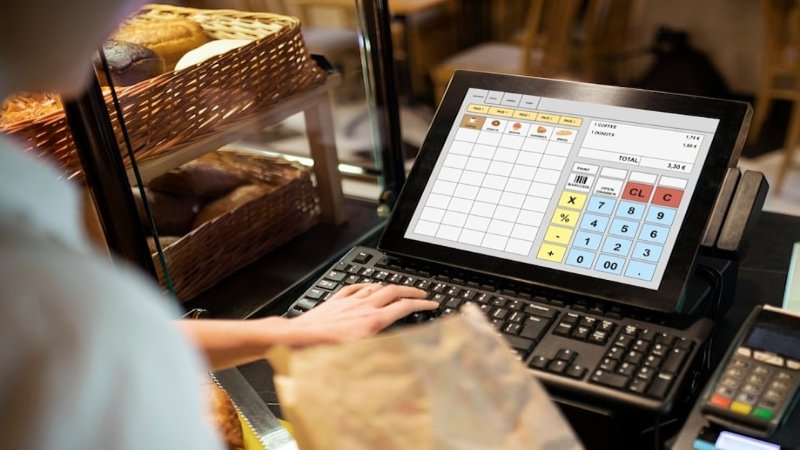
The PC America software interface is designed for high-volume environments. It reduces the number of touches required to close a sale.
Quick Transactions
The layout is customizable. You can put your most popular items right on the main screen.
- Fast Scanning: The system works with high-speed barcode scanners. It processes items instantly.
- Touch Screen Keys: For items without barcodes, like produce or baked goods, you can use large photo buttons.
- Age Verification: For stores selling alcohol or tobacco, the system can prompt for ID. It can even scan a driver’s license to verify age quickly.
Flexible Payment Options
Customers want to pay their way. The software supports all modern payment types. You can accept credit cards, debit cards, gift cards, and EBT with ease. It also handles split payments if a customer wants to pay partly in cash and partly on a card.
Improving Employee Accountability
Labor is often the largest expense for a business. You need to ensure your staff is working efficiently. You also need to protect your business from internal theft. This platform provides strong tools to manage your team.
Integrated Time Clock
You do not need a separate machine to track hours. Employees clock in and out directly on the POS screen.
- Accurate Payroll: The system automatically calculates the total hours worked. This eliminates math errors when doing payroll.
- Scheduling: You can enforce schedules. The system can stop an employee from clocking in too early.
- Labor Cost Analysis: You can see your labor cost as a percentage of your sales. This helps you decide if you need to cut staff on a slow day.
Theft Prevention
Security is built into the core of the system.
- Permission Levels: You decide what each staff member can do. You might allow a manager to void a sale, but block a cashier from doing it.
- Exception Reporting: The system tracks suspicious activity. It flags excessive voids, discounts, or no sales.
- Camera Integration: Some setups allow you to overlay transaction text on security camera footage. You can see exactly what was rung up while watching the video.
Robust Reporting for Better Decisions
You cannot improve what you do not measure. Many owners fly blind because they lack data. They guess what is selling. They guess what their margins are.
This software removes the guesswork. It provides detailed reports that show the health of your business.
Sales Insights
You can view sales data in many different ways.
- Hourly Sales: Identify your busiest times of day. This helps you schedule more staff during rush hours.
- Best Sellers: See exactly which products are making you the most money.
- Dead Stock: Identify items that have not sold in months. You can then discount them to clear up shelf space.
Profit Tracking
Revenue is not the same as profit. The system tracks the cost of every item. It calculates your profit margin on every sale. This helps you identify items that might need a price increase. It ensures you are actually making money, not just moving product.
Building Customer Loyalty
Repeat customers drive long-term success. PC America makes loyalty effortless.
Built-in Rewards
The software includes a loyalty program out of the box.
- Points System: Customers earn points for every dollar they spend. They can redeem these points for discounts later.
- Customer Profiles: You can save customer details. You can see what they bought in the past. This allows you to offer personalized service.
- Marketing Tools: You can collect email addresses at the point of sale. This allows you to send coupons or newsletters to bring them back.
Adaptability Across Industries
One reason this software is so popular is its versatility. It is not just for one type of store. It offers specific features for different sectors.
Retail Edition
For grocery stores, convenience stores, and boutiques, the retail version focuses on inventory and scanning speed. It handles thousands of SKUs without slowing down.
Restaurant Edition
Perfect for cafés, delis, and quick-service restaurants.
- Supports kitchen printers
- Offers product modifiers (e.g., “no mayo,” “extra cheese”)
- Handles table service and tipping
- Works for hybrid retail + food-service environments
Conclusion
Running a business requires the right foundation. You need tools that are strong enough to handle the daily grind. A system that keeps your inventory under control and safeguards your profits is necessary.
Choosing PC America software is a strategic decision for long-term efficiency. It gives you the control you need to grow, turning your point of sale into a point of service. It handles the math and the tracking so you can focus on what matters most: your customers.
See Also: How Background Makers Can Improve User Experience and Interface Aesthetics

Lucas is a writer at Magazine Outstanders, with 3 years of experience covering business, technology, health, and lifestyle topics. He specializes in turning complex ideas into clear, well-researched, and engaging articles that keep readers informed and inspired. Driven by curiosity and a passion for storytelling, Lucas strives to deliver content that is accurate, valuable, and easy to connect with.